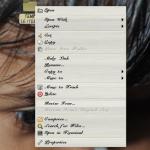
New feature in Nautilus – resize icon on desktop.

2011-01-10 1 min read GNOME Learning

On Desktop on Gnome using nautilus, now you can resize individual icons. Just right click on the icon to resize and in the menu you will get a resize icon :

[Resize icon][1]
Resize icon

and then you can resize the icon from the borders:

[Resize icon][2]
Resize icon
Enhanced by Zemanta

Speed Up Firefox by Moving Your Cache to RAM

2011-01-08 2 min read Firefox
The 536,870,912 byte (512×2 20 ) capacity of t...
  <dd class="wp-caption-dd zemanta-img-attribution" style="font-size: 0.8em;">
    Image via <a href="http://commons.wikipedia.org/wiki/File:Memory_module_DDRAM_20-03-2006.jpg">Wikipedia</a>
  </dd>
</dl>

Speed Up Firefox by Moving Your Cache to RAM, No RAM Disk Required [Firefox Tip] Click here to read Speed Up Firefox by Moving Your Cache to RAM, No RAM Disk Required We’ved talked about moving your cache files to a RAM disk to speed things up, but it turns out Firefox has this feature built in. Here’s how to turn it on. More »

Continue reading

Ultralight DIY distribution

2011-01-02 1 min read Linux
Victorinox Presentation Master (new)
  <dd class="wp-caption-dd zemanta-img-attribution" style="font-size: 0.8em;">
    Image via <a href="http://commons.wikipedia.org/wiki/File:Vx_presentation_master_new.jpg">Wikipedia</a>
  </dd>
</dl>

Tiny Core: Ultralight DIY distribution

When reviewing a lightweight distribution, the term Swiss Army knife is sometimes employed to indicate that it’s packed with features despite a diminutive size. However, at 11MB for the ISO, Tiny Core is more of a blank-slate distribution, as when booted from a CDROM or a USB stick, it presents the user with a simple desktop consisting merely of a task launcher and a package manager. It contains some good ideas and it’s already perfectly usable, but I think it needs a few more refinements in order to become great. more»

Continue reading

Execute a command with a timeout

2010-12-29 1 min read Bash Learning
Official Ubuntu circle with wordmark. Replace ...
  <dd class="wp-caption-dd zemanta-img-attribution" style="font-size: 0.8em;">
    Image via <a href="http://commons.wikipedia.org/wiki/File:Ubuntu_logo.svg">Wikipedia</a>
  </dd>
</dl>

Execute a command with a timeout

  <td>
    <div class="text codecolorer">
      &nbsp;timelimit -t100 somecommand
    </div>
  </td>
</tr>
1

I found this in Ubuntu repos, and consider it better than timeout.

* View this command to comment, vote or add to favourites * View all commands by CodSpirit

Continue reading

write the output of a command to /var/log/user.log… each line will contain $USER, making this easy to grep for.

2010-12-28 2 min read Bash Learning Linux

write the output of a command to /var/log/user.log… each line will contain $USER, making this easy to grep for.

  <td>
    <div class="text codecolorer">
      &nbsp;log() { (echo "$ $@";$@) | logger -t $USER; }
    </div>
  </td>
</tr>
1

This command is useful if you want to copy the output of a series of commands to a file, for example if you want to pastebin the output from ‘uname -a’, ‘lspci -vvv’ and ‘lsmod’ for video driver trouble-shooting on your favorite Linux forum.

Continue reading
Older posts Newer posts